Wednesday, 14 May 2014

Investigation

Unit Question: 
How has technology influenced the way we see the world around us? 

A collage is a technique used MAINLY in visual arts. This artwork is made by assembling different forms or pictures together to make a new whole. A collage can include things like photographs, magazine or newspaper clippings, texts etc. 

Magazine clippings put together to make a new picture. 

Little pictures put together to make a new picture (an apple).


What are collages used for?
Collages can be used for many different things for example: 

  • To bring out an idea
  • A nice photograph to put up 
  • For advertising something
  • A mosaic photo (maybe for family) 
  • To send a message
A mosaic. You can put little pictures (maybe of yourself) to make a big photo (maybe of yourself).
What do they look like? 
Collages all look different. There are more artistic ones like putting together magazine clippings to make a beautiful picture or there are more simple ones for example putting together some photos of a fun party with your friends. Below I will display some examples of different collages. 
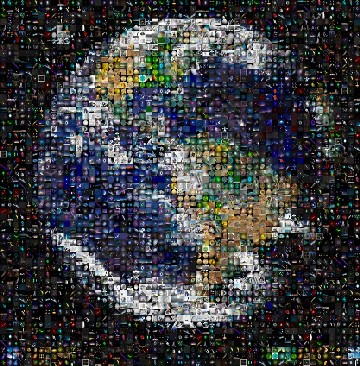
A mosaic. Little pictures (in grid form. Not overlapping) put together to make a big photo.
A shape or photo made with little pictures overlapping each other. 
A very simple collage. Very easy to make and edit. 
A more artistic collage. Made with newspaper/magazine clippings.
How can you effectively portray the underlying theme of the environmental element/social element to an audience? What kind of collage would you attempt?
Making a collage to send a message representing something environmental or social is a more interesting and artistic way to get something through to your audience. With a collage, you can give visual evidence of your point instead of writing many paragraphs trying to explain your point. Besides, visual presentation is more engaging to younger and the elderly. I would love to attempt a collage that sends an important message for example:
  • Recycling
  • Charity
  • Bullying
  • Global Warming
How is a collage useful? 
You don't only see collages on the internet or in art. You can also see them used in brochures, posters around your town, videos sending a message and much more. We all know that our countries are becoming more international, that means more people from different countries who don't all speak the same language as us. As I said before, visual aid in collages are more useful. Also, if you're working for a tourism country and you're trying to advertise the countries you have a business in, you can use collages to put together pictures of trips, beautiful sceneries and more.  

Develop a Design Brief
When I make my collage I want to think about points that would draw attention to my brochure because it discusses a subject that's interesting and needs more recognition in our world today. I want to think about: 

  • News: Is the topic well known because of a news story that came out? 
  • Media: Is the media talking about it that gives it attention? 
  • Design: Is the topic easy to research about? Can it be created in a collage in a creative way? Is it easy to make into a collage?
Formulate a Design Specification 
When producing my collage, I need to consider key points about the design. From points that would make it look attractive, to things like how will I print it off, or where will I create it? Things I need to consider: 
  • Font/Size: How do I want my title to look like? How do I want my body text to look like? How will I make it different from the rest?
  •  Color: Will certain colors help my brochure to stand out? Do I make the colors eye catching and matching or absolute different colors? 
  • Printing options: Where will I print it? In what format will I print it in?  
  • Software limitations: What software is available for me to use? 
Describe in detail how you will test your product: 


Wednesday, 19 March 2014

Tech fair reflection

The tech was very fun for Nazanin and I because we displayed our project to many people and they all gave us positive comments. We took turns at presenting our projects to students and teachers. They told us we made it seem so emotional but also, parts of our project was funny. We had a lot of fun because we went to see others' projects and they were really good and also, we were around our friends at the tech fair so we didn't get bored or lonely. I think we both did a really great job and I'm very happy with our outcome. 

We now have 253+ views on YouTube. 


Wednesday, 12 March 2014

Design Reflection

Before we started anything, we had to plan out our video. We first figured out the story line, like who is going to be what and going to do what. Then, we needed to figure out what we're going to film with, what we're going to edit with and where we're going to film everything. 

To film our bullying video, we had to research about iMovie and also about people who are being bullied. We researched things like how they felt and what they had to deal with. Once we got all our information, we decided to start filming. We decided that I would be the person who was going through bullying and my partner, Nazanin would be filming but would also appear somewhere in the video. We knew we didn't have much time to film everything and edit it before the video so we had to use the resources that would not be time-consuming. All the filming was done with an iPhone 5c. Filming with the iPhone 5c gives pretty good quality and it's also really easy to upload to iMovie and edit the clips. We started filming everything in school because it's easier to film in school when we have free time and then we edited everything in our own time on a Mac. It took us one week to film and edit everything. It's also pretty tricky because we had other assessments due around the same time. At the moment, we have 211 views on YouTube and from everyone who watched it, we got mostly positive comments.

I'm really happy about the way it turned out because we were really looking forward to making this and everyone liked it. We worked at a really good pace and managed to finish everything on time. We worked well together and made sure we both contributed to the project.  


Wednesday, 19 February 2014

Tech Fair Ideas

Bullying video: 
We want to make a video about bullying to raise awareness. 
Pros:
It'll raise awareness.
Bullied people will feel more comfortable.
Cons: 
There isn't much to put in the video. 

Altoid Can Solar USB Charger:
The materials for this project can be bought online or at a local store. It's very cool because it consists of products like solar panels and is a very effective charger. 
Pros: 
It's very interesting to make and learn about
Cons: 
It's really difficult to make it.

Mason Jar Speakers: 
These mason jars are very easy to get a hold of and it's like a DIY project. 
Pros: 
It's simple to make 
You can make the speakers different sizes and shapes
Cons: 
Installing the speakers can be very complicated 

Saturday, 8 February 2014

Evaluation on Form

I think my final piece turned out pretty good. I used my draft as a guideline especially when it came to the little details like the font size, font color, background and my logo website (because I planned it all). I must admit, my form does look a little simple. It doesn't have many boxes and it looks like something at a beginner level but I don't mind because that's how I planned it. When I was creating the form, I had to add in a couple of boxes because it had huge gaps which were empty. Apart from that, everything else went according to plan. 

School Application Form

 My draft.
My end piece. 

Saturday, 11 January 2014

Evaluation on Comments

All the comments were thankfully positive. Everyone liked the creativity and color of my blog. Some of the people who commented also loved the effort I put into my blog and the amount of detail. A majority of them wanted to see a picture of our brochure/the final product. Also, according to one of the people that commented, my brochure could be more colorful. 

Of course, after reading the comments I made some changes to my blog. I added pictures of our brochure. On the front page of the brochure, there's a picture of our final product (which some people really wanted to see). I hope that now my blog is satisfying and complete. 

Thanks to the people who commented!